아래 강의를 수강하며 배운 내용을 정리한 글입니다
[한 번에 끝내는 자바스크립트: 바닐라 자바스크립트로 SPA 개발까지 - 효빈] https://inf.run/WfRmY
상태관리의 기본 틀은 아래와 같습니다
this.state = {};

this.setState = (nextState) => {
this.state = nextState;
this.render();
};

this.render = () => {};
상태(State): 값이 변하는 데이터
중간 프로젝트에 상태 관리를 적용하여 개선해보겠습니다
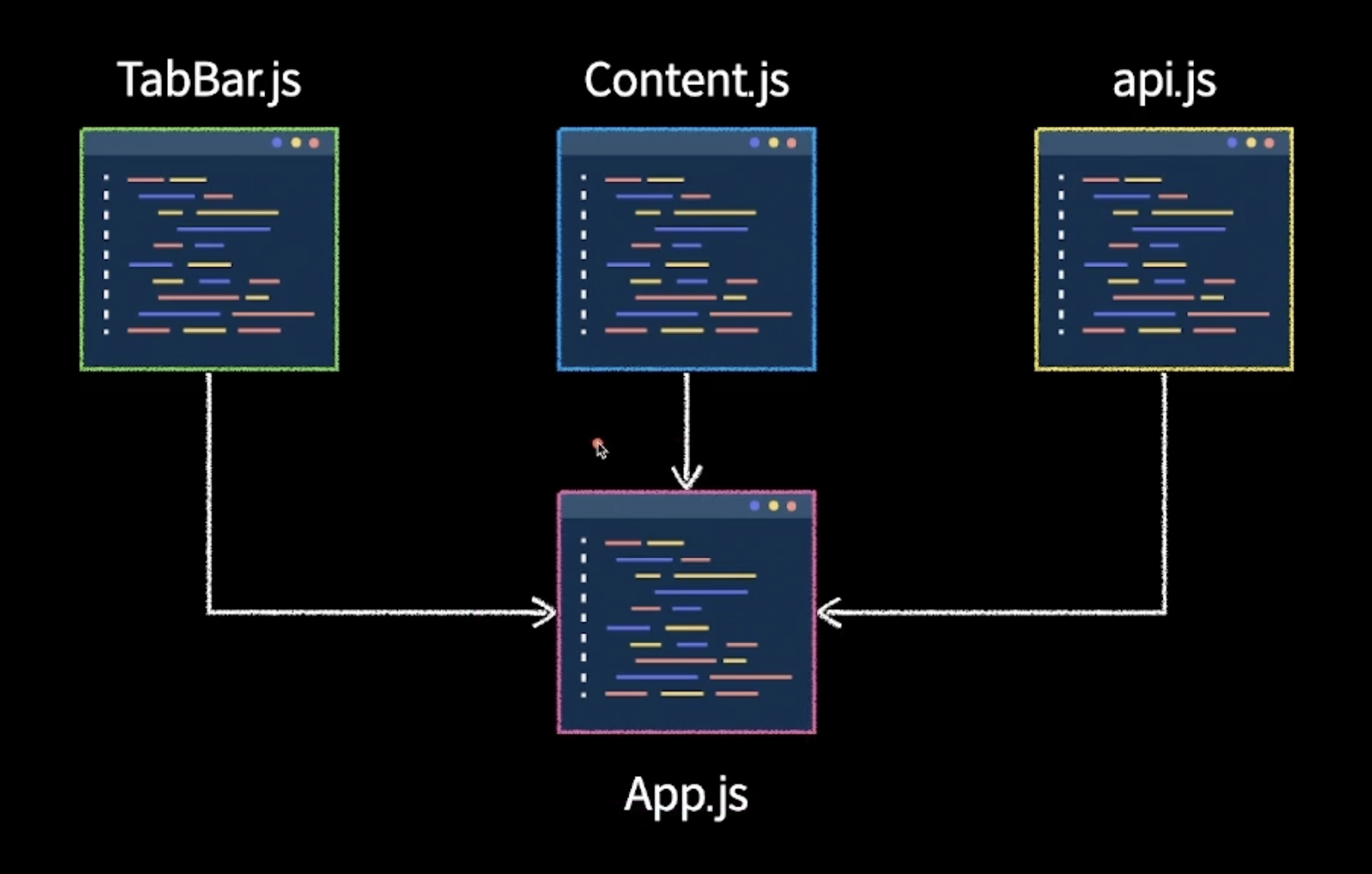
index.html
<div id="app"></div>
<script type="module" src="./src/index.js"></script>
index.js
import App from "/src/App.js";
const $app = document.getElementById("app");
new App($app);
App.js
import TabBar from "/src/components/TabBar.js";
import Content from "/src/components/Content.js";
import { request } from "/src/components/api.js";

export default function App($app) {
  this.state = {
    currentTab: "all",
    photos: [],
  };

  const tabBar = new TabBar({
    $app,
    initialState: "",
    onClick: async (name) => {
      this.setState({
        ...this.state,
        currentTab: name,
        photos: await request(name === "all" ? "" : name),
      });
    },
  });

  const content = new Content({
    $app,
    initialState: [],
  });

  this.setState = (newState) => {
    this.state = newState;
    tabBar.setState(this.state.currentTab);
    content.setState(this.state.photos);
  };

  const init = async () => {
    try {
      const initialPhotos = await request();
      this.setState({
        ...this.state,
        photos: initialPhotos,
      });
    } catch (error) {
      console.log(error);
    }
  };

  init();
}
api.js
const API_URL = "https://animal-api-two.vercel.app/";

export const request = async (name) => {
  let res = await fetch(name ? `${API_URL}${name}` : API_URL);
  try {
    if (res) {
      let data = await res.json();
      return data.photos;
    }
  } catch (error) {
    console.log(error);
  }
};
TabBar.js
export default function TabBar({ $app, initialState, onClick }) {
  this.state = initialState;
  this.onClick = onClick;

  this.$target = document.createElement("div");
  this.$target.className = "tab-bar";
  $app.appendChild(this.$target);

  this.template = () => {
    let temp = `<div id="all">전체</div><div id="penguin">펭귄</div><div id="koala">코알라</div><div id="panda">판다</div>`;
    return temp;
  };

  this.render = () => {
    this.$target.innerHTML = this.template();

    let $currentTab = document.getElementById(this.state);
    $currentTab ? ($currentTab.className = "clicked") : "";

    const $tabBar = this.$target.querySelectorAll("div");

    $tabBar.forEach((element) => {
      element.addEventListener("click", () => {
        onClick(element.id);
      });
    });
  };

  this.setState = (nextState) => {
    this.state = nextState;
    this.render();
  };

  this.render();
}
Content.js
export default function Content({ $app, initialState }) {
  this.state = initialState;

  this.$target = document.createElement("div");
  this.$target.className = "content";
  $app.appendChild(this.$target);

  this.template = () => {
    let temp = [];
    this.state.forEach((element) => {
      temp.push(`<img src="${element.url}" alt="${element.name}" />`);
    });
    return temp;
  };

  this.render = () => {
    this.$target.innerHTML = this.template().join("");
  };
  this.setState = (nextState) => {
    this.state = nextState;
    this.render();
  };

  this.render();
}'JavaScript' 카테고리의 다른 글
| [JavaScript] Express.js (0) | 2025.10.16 |
|---|---|
| [JavaScript] SPA (0) | 2025.10.16 |
| [JavaScript] 컴포넌트, 모듈 시스템 (0) | 2025.10.13 |
| [JavaScript] 중간 프로젝트 - 동물앨범 만들기 (0) | 2025.10.10 |
| [JavaScript] this (0) | 2025.10.02 |